Very neat. It seems to me the really interesting bit here is the ability to add execution meaning to arbitrary bits of text. Can anyone who uses Acme comment on whether or not that is primarily what gives Acme its power? Is there something else key to it that isn't shown cleanly in the video?
Interestingly, I also see Light Table as an "Integrating" Development Environment - something that utilizes all the amazing tools out there and strings them together into a very fluid workflow. I think we need to decouple the raw functionality of dev tools from the experience of their use, since it seems to me the latter is infinitely configurable and far too subjective to get "right" in all cases.
It's definitely the ability to parse expressions like "<file>:<lineno>" and open files at the right position, it essentially makes it integrated with many many unix tools without actually having to write any integration code.
The ease of piping the selection through an external program is a close second.
However I do not use it.
What's funny about acme is that it's a perfect metaphor for the entire plan9: it shows you how striving for a simple, beautiful design can create new, great solutions to old problems.
But at the same time it will also kill the adoption of the product completely: acme doesn't support any keybindings (doesn't fit the desing), no syntax highlighting (not the editor's job to parse code), nothing but bitmapped fonts (implementing externally defined standards is a chore), tags file support (doesn't fit the design), incremental search (doesn't fit the design), horizontal scrolling (makes it complicated to use the same editor control for the tags too), configuring the color scheme (no), weird non-standard behaviour of up and down keys (we just like it better this way)...
Bringing any of this up to a 9fan will also be a great metaphor for the friendliness of the community.
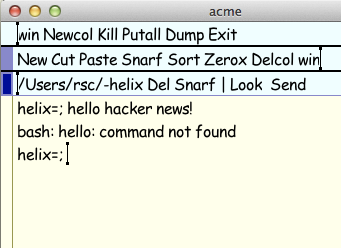
I won't argue any of your points but one. You can use whatever system fonts you like on OS X. Here's some Comic Sans for you: http://swtch.com/~rsc/hackernews.png
-- which is not so surprising as neither /mnt nor /usr/local/plan9/mnt exist.
ADDED. Actually, cannot get the -F flag to Acme to do anything. E.g., $PLAN9/font/luc/latin1CW.18.font exists, but Acme started with "acme -F $PLAN9/font/luc/latin1CW.18.font" uses the same font as Acme started with "acme".
Sorry, my original reply with the screenshot included a command line, but it got lost in the internet tubes, and when I reposted the reply I forgot the command line.
acme -f /mnt/font/ComicSansMS/16a/font is how I made the screenshot. Run fontsrv -p . to get a list of the fonts you can use.
I had seen acme color theme files in a previous plan9port repository version but can't seem to find them today. I believe I was also able to use them. Does anyone remember or know more?
At Bell Labs, Rob switched acme and sam from black and white to color in the development version of Plan 9, called Brazil, in the late fall of 1997. I used Brazil on my laptop as my day-to-day work environment, but I was not a developer. I remember writing Rob an email saying how much I enjoyed having color but that it would be nice to have options to set the color scheme. He wrote a polite but firm response back explaining his position. He had worked with a graphic designer to choose a visually pleasing color palette. He said he believed strongly that it was important for the author of a system to get details like this right instead of defaulting on that responsibility by making every user make the choice instead. He said that if the users revolted he'd find a new set of colors, but that options wouldn't happen.
It was really a marvelous email, polite yet firm and a crystal clear explanation of his philosophy. Over the years I have from time to time spent hours trying to find a copy of that email. It is lost.
But I can say definitively, both as a matter of philosophy and because I did the lion's share of the open source release work for both systems since color went in, that there have never been color theme files in the Plan 9 distribution, nor in plan9port.
I think this approach to color selection is a wee bit patronizing, assuming that all users are the same (and gives waaaaay to much credibility/authority to graphic designers). Never mind that even if you agree with the intended choice, you'd need to make adjustments to cope with environmental factors (displays, light etc.).
Interesting but I could swear I had seen some theme files and had succesfully tested them IIRC. It was either for 9term or acme if my memory ain't confused.
The window management is a huge win for me, if you'll pardon the unintentional pun. It's so much simpler and fluid than in Emacs or Vim, at least for me. I just kind of throw windows around and resize them with an ease and speed that I was never able to achieve on Emacs. For instance, when using Emacs I may have as many as 4 windows open at a time, frequently switching buffers around with the clumsy C-x b switching (I know there are better switchers). With Acme, I'll have 30 windows open, most of them stacked up with just the tag lines visible until I need them. When I need one, I just mid-click on the little box and it expands.
Execution of arbitrary text and loading/plumbing files/text with the mouse buttons is also really powerful for me, as you point out. I haven't finished watching the video yet (I'm at work), but in case he doesn't cover it, mouse chording is one of the most important capabilities in my mind. Makes copy-pasting significantly quicker.
(I have used both Acme and Emacs but only a little bit each) I can believe that most of the time it is easier to switch to the mouse to move the cursor where you want if it is no where near your current position. But what about just moving up and down one or two lines? Do you really just use Ctrl-A twice to go up a line? Or do you use the mouse? Or is there some alternative that I haven't heard yet?
As you say, there are great use cases for just having a simple keyboard shortcut. Ron Minnich made "smacme", a modified acme with the basic Emacs C-f, C-b, C-n, C-p bindings in; you can find it in the sources directory IIRC, but in any case it's really a pretty simple hack.
I've only found a reference in a 2006 post from Ron. Is it a modification to acme which would need to be ported to plan9port or is it already part of plan9port's acme or is it maybe just a set of scripts to source on acme startup?
Have you written up a summary of your experiences? I would love to see a comparison from an Emacs user that switched to Acme.
So many of the concepts just seem painful to me at first glance (What? I have to use the mouse for things?) but I am sure that there is some merit to them, given that some of the greats used it.
What OS do you use it on, and what is it like using the plumber with other (non-Plan 9) components of the system?
I haven't written up a big summary, just occasional posts like this on HN and elsewhere. I started life as an Emacs user, switched to Vim, flip-flopped between the two for various tasks. The whole time, in the background, I was playing with Plan 9 and Acme; eventually I got sufficiently addicted to Acme that I dropped Emacs and Vim for most of my editing. I still use Emacs as a mail reader (and nothing else), Vim for quick edits or working on a remote system, and Acme for everything else.
I don't actually take the Plan9Ports thing as far as I could (I work on Linux, mostly, often with a drawterm connection open to our Plan 9 server). I run a plumber, and Acme, but I don't run rio (the window manager) or 9term (the xterm replacement), which means I'm going to miss out on some of the plumbing stuff. Mostly I just run the plumber so I can say "B <filename>" at a shell to have it pop up in my Acme.
Thanks. I find a lot of the Plan 9 stuff very fascinating, and I often think about what it would take to port some of the functionality to OSX.
I find it interesting that you mentioned the window management as being one of the big selling points. I have been working on a tiling window manager for OSX, and might try adding a mode like that. It would mean splitting my emacs into frames, which could be weird. Probably worth messing around with, though.
Also, I have several emacsclient based commands to do things like the plumber/acme, but is a pretty poor attempt at reimplementation.
Emacs buffers ergonomy is quite low. I found some elisp to transpose buffers layout (pretty awesome). Some maximize / shadow code would be handy. It would be great to have one layout lib included in standard distro.
Some extensions like FFAP (file-find-at-point) lookup the word at point in the filesystem, some leverage font and mouse infrastructure to turn text into action.
10$ it's quite easy to do, a generalized *-at-point, the "challenge" is to make it as configurable.
Unknowingly I just reimplemented part of FFAP. After a little playing with Acme I want to add some of its features to my emacs (FFAP is one of these, since click/command opening included files in my .tex or code is great)
Next step is making my FFAP more intelligent (depending on buffer extension & mode) and then make it "execute at point" if it is not intended to be a file (depending on context)
Don't expect anything fancy (at least yet... My free time is close to 0, I'm doing this while waiting for something else to finish...) I'm still deciding what I want it to do and how. For now, the magic function does its job... (I can open included files in TeX documents and jump from TeX output undefined lines to the respective file and line.) And my code is full of messages and lacking a clear structure of region selection. I need many helper functions down the road. But stay tuned, everything can improve :)
No, I used to hold some code in my googlecode repo, but gave up a long time ago. Until I get more proficient with git, I'll probably just post it in my blog (and then the marmalade-repo, just like I did with gnusnotes.el) when it is decent enough for general usage


Interestingly, I also see Light Table as an "Integrating" Development Environment - something that utilizes all the amazing tools out there and strings them together into a very fluid workflow. I think we need to decouple the raw functionality of dev tools from the experience of their use, since it seems to me the latter is infinitely configurable and far too subjective to get "right" in all cases.